Logs
Orbis Studio produces logs for individual flows and the Orbis Studio application itself using the structlog library for logging.
By default, OSS Orbis Studio writes logs to stdout. To write logs to a file, set ORBISAGENTS_LOG_FILE to the desired path.
Log storage
The ORBISAGENTS_CONFIG_DIR environment variable controls the configuration directory. By default, OSS logs go to stdout; use ORBISAGENTS_LOG_FILE to write to a specific file.
The default configuration and cache locations depend on your operating system and installation method:
-
Orbis Studio Desktop:
- macOS:
/Users/<username>/Library/Logs/com.LangflowDesktop - Windows:
C:\Users\<username>\AppData\Local\com.LangflowDesktop\logs
- macOS:
-
OSS Orbis Studio:
- macOS:
/Users/<username>/Library/Caches/langflow - Linux:
/home/<username>/.cache/langflow - Windows/WSL:
C:\Users\<username>\AppData\Local\langflow\langflow\Cache
- macOS:
To customize log storage locations and behaviors, set the following Orbis Studio environment variables in your Orbis Studio .env file, and then start Orbis Studio with uv run langflow run --env-file .env:
| Variable | Format | Default | Description |
|---|---|---|---|
ORBISAGENTS_CONFIG_DIR | String | Varies | Set the Orbis Studio configuration directory where files and logs are stored. Default path depends on your installation, as described in the preceding list. |
ORBISAGENTS_LOG_LEVEL | String | ERROR | Sets the log level as one of DEBUG, ERROR, INFO, WARNING, and CRITICAL. For example, ORBISAGENTS_LOG_LEVEL=DEBUG. |
ORBISAGENTS_LOG_FILE | String | Not set | Sets the log file storage location if you want to use a non-default location. For example, ORBISAGENTS_LOG_FILE=path/to/logfile.log. If not set, logs are written to stdout. |
ORBISAGENTS_LOG_ENV | String | default | This variable is the primary log format controller. container: JSON format for Docker/structured logging. container_csv: Key-value format for data analysis. default or unset: Uses ORBISAGENTS_PRETTY_LOGS to determine format. |
ORBISAGENTS_PRETTY_LOGS | Boolean | True | This variable controls log output format when ORBISAGENTS_LOG_ENV=default or unset. When true, uses structlog's ConsoleRenderer. When false, outputs logs in JSON format. |
ORBISAGENTS_LOG_FORMAT | String | Not set | Switch between key-value format and console format. Set to key_value for key-value format or console to use structlog's ConsoleRenderer. This variable only works when ORBISAGENTS_LOG_ENV=default and ORBISAGENTS_PRETTY_LOGS=true. |
ORBISAGENTS_LOG_ROTATION | String | 1 day | Controls when the log file is rotated, either based on time or file size. For time-based rotation, set to 1 day, 12 hours, or 1 week. For size-based rotation, set to 10 MB or 1 GB. To disable rotation, set to None. If disabled, log files grow without limit. |
ORBISAGENTS_ENABLE_LOG_RETRIEVAL | Boolean | False | Enables retrieval of logs from your Orbis Studio instance with Logs endpoints. |
ORBISAGENTS_LOG_RETRIEVER_BUFFER_SIZE | Integer | 10000 | Set the buffer size for log retrieval if ORBISAGENTS_ENABLE_LOG_RETRIEVAL=True. Must be greater than 0 for log retrieval to function. |
LANGFLOW_NATIVE_TRACING | Boolean | true | Enables the tracer to record execution traces directly in the Orbis Studio database for use in Trace View. Set to false to disable tracing. |
LANGFLOW_ENVIRONMENT | String | Not set | Adds an environment field to every JSON log record when set (staging, production, etc.). Omitted otherwise. |
LANGFLOW_LOG_LEVELS | String | Not set | Per-logger level overrides as name=LEVEL,name=LEVEL. Overrides the default for specific loggers. Malformed entries raise a UserWarning at startup. Example: sqlalchemy.engine=WARNING,httpx=INFO. |
LANGFLOW_LOG_REDACT_KEYS | String | Not set | Comma-separated extra keys to scrub from JSON log records, on top of the defaults (password, api_key, token, authorization, cookie, etc.). |
LANGFLOW_LOG_TRACE_LOCALS | Boolean | false | Include frame locals in structured tracebacks. Off by default because locals can leak secrets; enable only for local debugging. |
LANGFLOW_SERVICE_NAME | String | langflow | Value of the service field on every JSON log record. Used as a label by log aggregators. See Grafana and Loki. |
LANGFLOW_VERSION | String | Not set | Adds a version field to every JSON log record when set. Omitted otherwise. |
The six logger-only settings above are read directly by the logger in this checkout; unlike ORBISAGENTS_LOG_FILE and ORBISAGENTS_LOG_ENV, their Orbis-prefixed aliases are not implemented.
View logs in real-time
By default, OSS Orbis Studio writes logs to stdout. To write logs to a file that you can tail, do the following:
-
Set
ORBISAGENTS_LOG_FILEto a file path in your.envfile:_10ORBISAGENTS_LOG_FILE=/path/to/langflow.log -
Start Orbis Studio with your
.envfile:_10uv run langflow run --env-file .env -
Follow the file you specified in
ORBISAGENTS_LOG_FILE:- macOS
- Windows
_10tail -f /path/to/langflow.log_10Get-Content -Wait -Path /path/to/langflow.logIf you don't see new log entries, check that Orbis Studio is running, and perform some actions to generate logs events. You can also check the terminal where you started Orbis Studio to see if logs are being printed there.
Flow and component logs
After you run a flow, you can inspect the logs for each component and flow run.
For example, you can inspect Message objects ingested and generated by Input and Output components.
View flow logs
In the visual editor, click Logs to view logs for the entire flow:
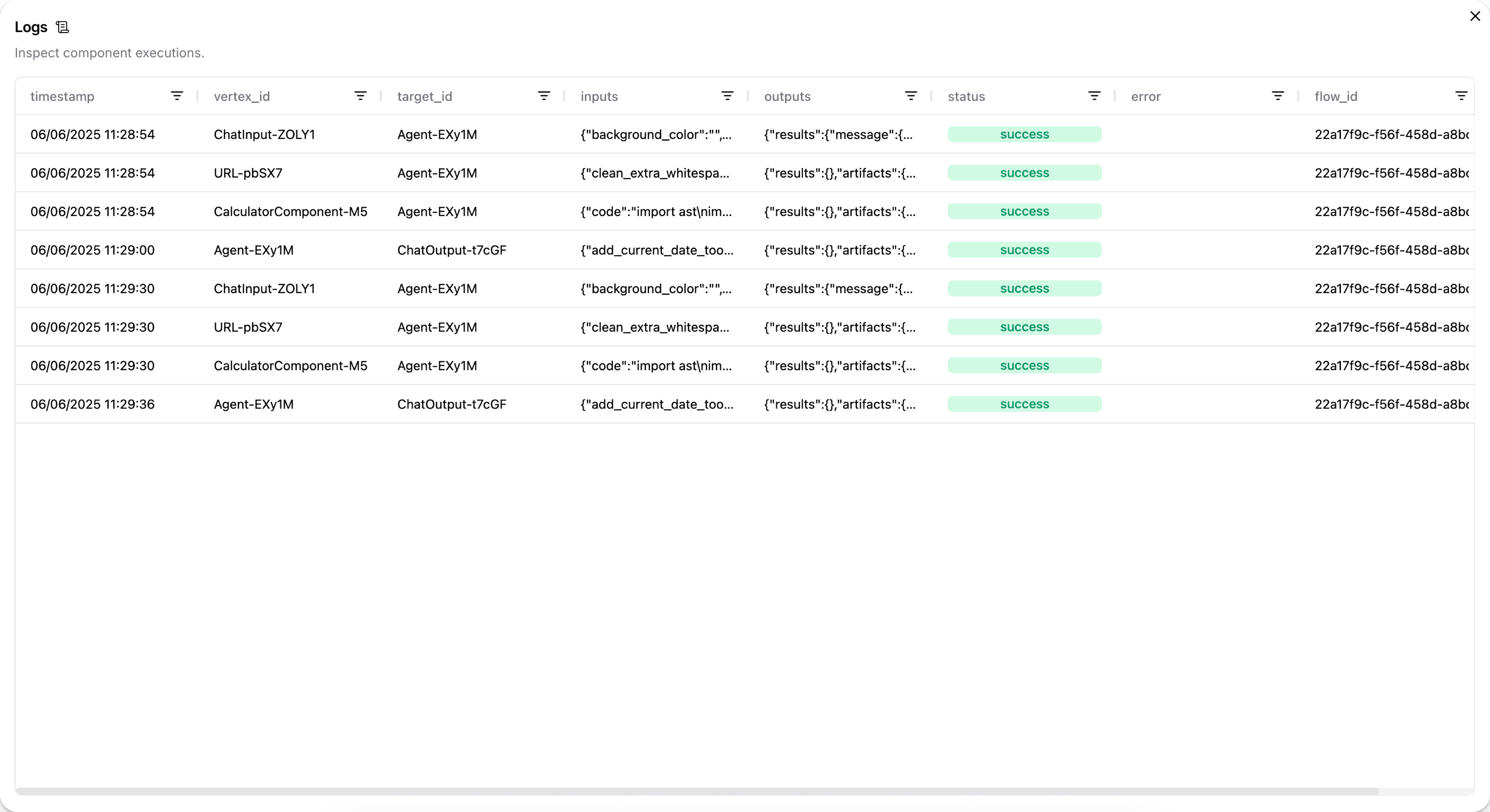
Then, click the cells in the inputs and outputs columns to inspect the Message objects.
For example, the following Message data could be the output from a Chat Input component:
_12 "messages": [_12 {_12 "message": "What's the recommended way to install Docker on Mac M1?",_12 "sender": "User",_12 "sender_name": "User",_12 "session_id": "Session Apr 21, 17:37:04",_12 "stream_url": null,_12 "component_id": "ChatInput-4WKag",_12 "files": [],_12 "type": "text"_12 }_12 ],
In the case of Input/Output components, the original input might not be structured as a Message object.
For example, a language model component can pass a raw text response to a Chat Output component that is then transformed into a Message object.
You can find .log files for flows at your Orbis Studio installation's log storage location.
For filepaths, see Log storage.
View chat logs
In the Playground, you can inspect the chat history for each chat session. For more information, see View chat history.
View output from a single component
When debugging issues with the format or content of a flow's output, it can help to inspect each component's output to determine where data is being lost or malformed.
To view the output produced by a single component during the most recent run, click Inspect output on the component in the visual editor.
Access Orbis Studio Desktop logs
If you encounter issues with Orbis Studio Desktop, you might need to access startup logs for debugging. Follow the steps for your operating system.
- macOS
- Windows
-
Open Terminal and run:
_10cd ~/Library/Logs/com.LangflowDesktop -
To open the folder and view the log files, run the command:
_10open . -
Locate the
langflow.logfile.
-
Open the Command Prompt (CMD), and then run the following command:
_10cd %LOCALAPPDATA%\com.LangflowDesktop\cache -
Open the folder and view the log files:
_10start . -
Locate the
langflow.logfile.
You can use the log file to investigate the issue on your own.
The log file is only created when Orbis Studio Desktop runs. If you don't see a log file, try starting Orbis Studio Desktop first, then check for the log file.
Log format
By default, structlog uses ConsoleRenderer to produce human-readable output with the following structure:
For example:
_102026-05-17T18:18:29Z [info ] incoming request logger=langflow.api.run flow_id=flow-718 user_id=user-4823
JSON log format
Set ORBISAGENTS_LOG_ENV=container to switch structlog's terminal processor to JSONRenderer, so every line written to stdout is a JSON object containing the event message, level, timestamp, logger name, exception structure, and service metadata.
A typical record in JSON mode looks like the following:
_18{_18 "event": "incoming request",_18 "level": "info",_18 "logger": "langflow.api.run",_18 "timestamp": "2026-05-17T18:18:29.100798Z",_18 "service": "langflow",_18 "version": "1.10.0",_18 "environment": "production",_18 "user_id": "user-4823",_18 "flow_id": "flow-718",_18 "authorization": "***",_18 "cookie": "***",_18 "request_body": {_18 "input": "Tell me a joke",_18 "api_key": "***",_18 "session_id": "Session Apr 21, 17:37:04"_18 }_18}
When a log record includes an exception, the exception field contains a structured traceback instead of a plain string:
_16{_16 "event": "flow run failed",_16 "level": "error",_16 "logger": "langflow.api.run",_16 "timestamp": "2026-05-17T18:18:32.412Z",_16 "service": "langflow",_16 "exception": [_16 {_16 "exc_type": "ConnectionError",_16 "exc_value": "upstream returned 503",_16 "frames": [_16 {"filename": "/app/.../runner.py", "lineno": 142, "name": "run_flow"}_16 ]_16 }_16 ]_16}
Frame locals, which are local variables at each stack frame, are intentionally excluded by default because they can contain API keys, request bodies, and environment values. Set LANGFLOW_LOG_TRACE_LOCALS=true to include them for local debugging.
Stdlib loggers
Third-party libraries that use Python's standard logging module (uvicorn, sqlalchemy, httpx, langchain, asyncio) are routed through the same JSON stream in container mode. Their original logger name is preserved on the logger field, so log queries that work for application loggers also work for library output.
OpenTelemetry trace correlation
If opentelemetry-api is installed and an active span is present, every log record automatically picks up trace_id and span_id. OpenTelemetry is not a hard dependency; if it is not installed, the processor is a no-op and nothing else changes.